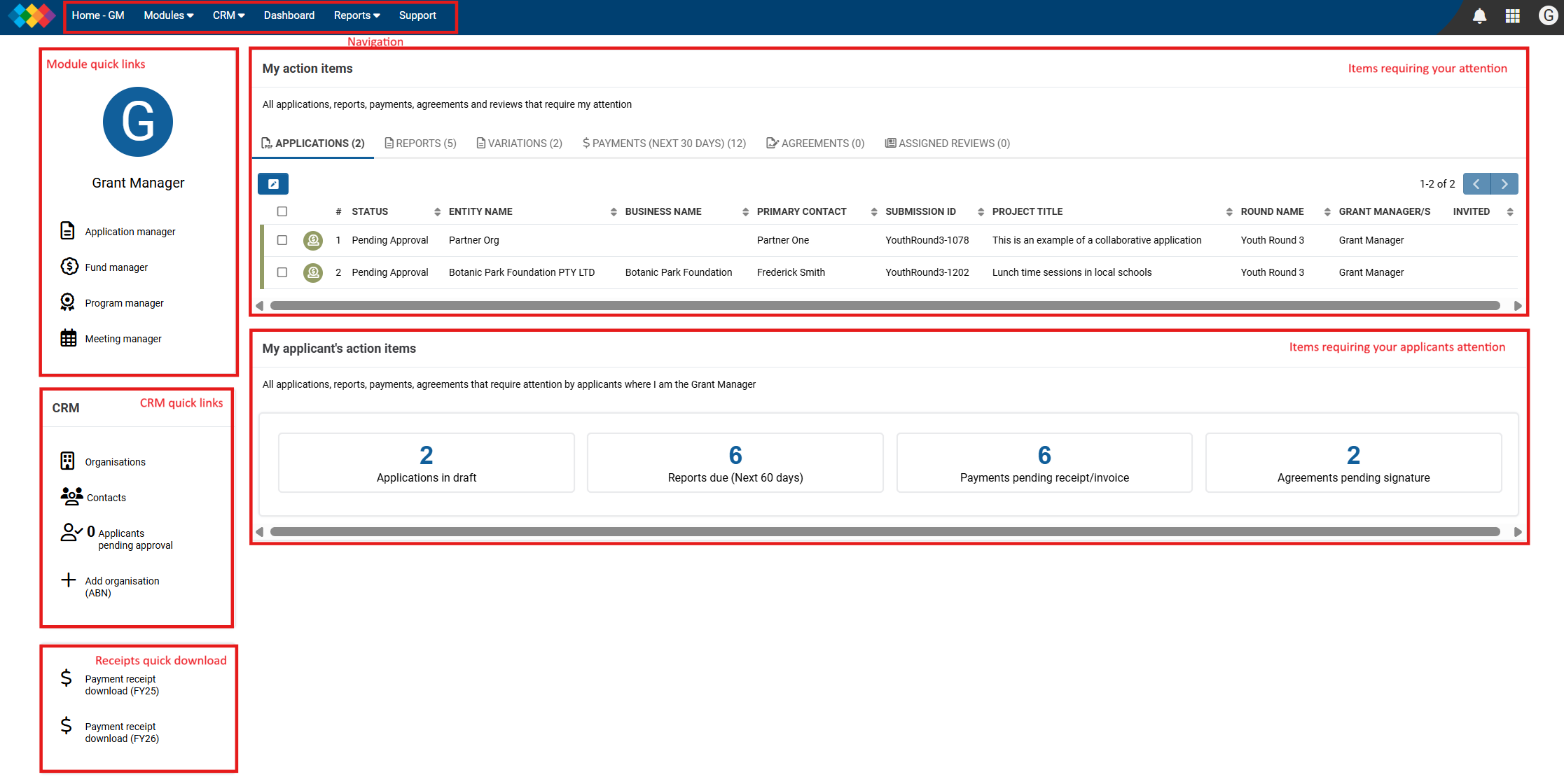
The Grant Manager home page is the first page that you see when logging into the Portal.
It has been designed to give you an overview of what items require your attention and what is outstanding or in progress for your applicants.
|
|
Module Quick Links | Links to all the modules. |
CRM Quick Links | Links to the organisations and contacts in the CRM. A link to users in the CRM that are pending approval Link to add a new organisation. |
My Action Items | This area has activities and applications that require your action or need to be reviewed. |
My Applicants Action Items | This area has activities and applications that need action by applicants where you are the Grant Manager. This can enable you to contact applicants if they have overdue items or applications needing to be submitted. |
Navigation | The area at the top of the page is your navigation. |
| Receipt quick download | This allows you to download any receipts from paid grants for either the current or previous financial year. |
Was this article helpful?
That’s Great!
Thank you for your feedback
Sorry! We couldn't be helpful
Thank you for your feedback
Feedback sent
We appreciate your effort and will try to fix the article